Monitoring changes in files and directories (using systemd.path and inotifywait)
In many cases it is useful to monitor changes in a directory, for example to:
- send a notification to Discord
- perform a backup after a change
- run automatic CI/CD scripts
- integrate with monitoring systems
I will present two methods here:
- 1️⃣
systemd.path- simple directory monitoring - 2️⃣
inotifywait- full recursive monitoring
systemd.path - a simple method for the main directory
systemd since version 215 has .path unit types, which allow monitoring of a file or directory.
At the time of writing this article, systemd is at version 257, so this feature is stable.
How does it work?
PathModified=/path- detects changes in the given directory (e.g. adding/removing a file or subdirectory)- does not monitor recursively - it will not detect changes inside subdirectories
Note
PathModified monitors changes to the directory itself, meaning:
Example: directory without subdirectories
Let’s assume we have the directory /var/www/html/.
Inside it, for example:
Implementation step by step
Notification script
File /usr/local/bin/discord_notify.sh:
#!/bin/bash

source ~/.bashrc
directory="/var/www/html"

curl -H "Content-Type: application/json" -X POST -d "{\"content\": \"Change detected in $directory\"}" "$DISCORD_WEBHOOK_URL"
Setting the environment variable
Set the environment variable `DISCORD_WEBHOOK_URL` in `~/.bashrc` or another appropriate place.
For environment variables, you can also use other files/methods — `.bashrc` may not always work.
If you use an `EnvironmentFile` in the unit configuration, `.bashrc` will not be read due to how systemd launches services.
Linux offers many options here — variables can be defined on the server itself, GitHub Actions, GitLab CI/CD, Jenkins, etc.
The example shown is just one of many possible approaches.
Make it executable:
.service unit
File /etc/systemd/system/discord-notify.service:
[Unit]
Description=Sending Discord notification on changes in directory

[Service]
Type=oneshot
ExecStart=/usr/local/bin/discord_notify.sh

[Install]
WantedBy=multi-user.target
.path unit
File /etc/systemd/system/discord-notify.path:
[Unit]
Description=Checking changes in /var/www/html

[Path]
PathModified=/var/www/html

[Install]
WantedBy=multi-user.target
Starting the service
Test
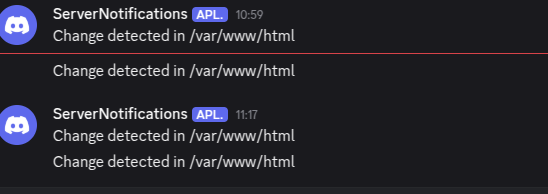
Example operations and results:
| Operation | Will the script run? |
|---|---|
touch /var/www/html/file1 |
✅ YES |
rm /var/www/html/file1 |
✅ YES |
mkdir /var/www/html/dirxx |
✅ YES |
touch /var/www/html/dirxx/file1 |
❌ NO |
rm /var/www/html/dirxx/file1 |
❌ NO |
Warning
systemd.path does not monitor changes inside subdirectories.
A change in /var/www/html/dirxx/file.txt will not trigger the script.
How PathExistsGlob works
The PathExistsGlob directive allows specifying a pattern (glob) that systemd will check.
If at least one file or directory matches the pattern, the linked .service will be triggered.
The mechanism works like the glob() function in bash:
*— any string of characters (but only one directory level)- e.g.
/opt/www/*— everything in the/opt/www/directory (assuming the directory is not empty) - e.g.
/backup/*.tar.gz— all.tar.gzfiles in the/backup/directory
Limitations
PathExistsGlobdoes not track file changes (such as modification of contents) — it only checks whether a matching file or directory exists.- Recursive patterns such as
**(e.g./opt/www/**/*.txt) are not supported insystemd.path. If you need recursive change tracking,inotifywaitis a better option.
Example usage
Let’s say we have a directory /var/incoming/, where a process or script drops .done files.
[Unit]
Description=Check if .done exists in /var/incoming

[Path]
PathExistsGlob=/var/incoming/*.done

[Install]
WantedBy=multi-user.target
As soon as a new *.done file appears, for example:
the linked .service will be triggered.
Another example — /var/www/ directory
Triggers the .service when any file or directory appears in /opt/www/:
- any file, e.g.
index.html - any directory, e.g.
images/
PathExistsGlob=/opt/www/* works only on the immediate children of /var/www/.
Changes within subdirectories (/opt/www/images/photo.jpg) are not directly tracked — if a subdirectory is created (mkdir images), it will trigger.
Summary
PathExistsGlob is a quick way to react to the presence of files or directories:
- ✅ simple directory monitoring
- ✅ reacting to new files
- ❌ no support for full recursion
- ❌ no tracking of modifications or deletions of files
For full recursive monitoring of a directory and file changes, inotifywait is a better choice.
inotifywait - recursive monitoring
If you want to monitor:
- a directory + subdirectories
- any changes to files
- creation/deletion of folders and files
→ systemd.path is not enough.
You will need the tool: inotifywait.
Installation
or
Monitoring script
File /usr/local/bin/discord_watch.sh:
#!/bin/bash

WATCH_DIR="/var/www/html"

inotifywait -mrq -e close_write,move,create,delete "$WATCH_DIR" | while read -r path action file; do

curl -H "Content-Type: application/json" -X POST -d "{\"content\": \"Change: ${action} -> ${path}${file}\"}" "$DISCORD_WEBHOOK_URL"

done
Make it executable:
systemd unit for discord_watch.sh
File /etc/systemd/system/discord-watch.service:
[Unit]
Description=Recursive monitoring of /var/www/html
After=network.target

[Service]
Type=simple
ExecStart=/usr/local/bin/discord_watch.sh
Restart=always

[Install]
WantedBy=multi-user.target
Starting the service
Test
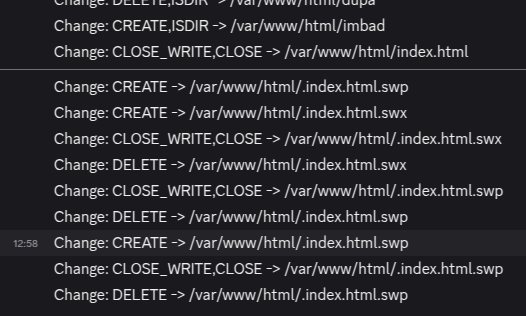
Example operations and results:
| Operation | Will the script run? |
|---|---|
touch /var/www/html/new_file |
✅ YES |
rm /var/www/html/file1 |
✅ YES |
mkdir /var/www/html/dir1 |
✅ YES |
touch /var/www/html/dir1/file1 |
✅ YES |
rm /var/www/html/dir1/file1 |
✅ YES |
Note
inotifywait allows full recursive monitoring of a directory and all its subdirectories.
You can monitor any events, such as: create, delete, move, close_write, attrib (metadata changes).
Summary
| Feature | systemd.path | inotifywait + systemd.service |
|---|---|---|
| Built-in to systemd | ✅ YES | ❌ (requires inotify-tools) |
| Recursion (subdirectories) | ❌ NO | ✅ YES |
| Monitoring file modifications | ✅ YES | ✅ YES |
| Monitoring changes in subdirectories | ❌ NO | ✅ YES |
| Performance | very good | very good |
When to use what?
- ✅
systemd.path— if the directory has no subdirectories or you are only interested in the directory structure itself - ✅
inotifywait— if you need full monitoring of an entire directory tree (e.g./var/www/htmlor/opt/dataetc.)
Practical notes
- File editors (such as
vim,nano) may cause temporary operations which will be seen ascreateandmove. In such cases it’s worth limiting the event types or applying a simple filter in the script. inotifywaitworks very fast and is low-overhead. For large directories, it’s worth testing its performance.